Some people might open up their brand new Helix Stadium and start rocking out! Not me….
The very first thing I did was create a new preset called Latency Test to test out the latency of the Line 6 Helix Stadium.
What is latency and why is it important when recording with virtual instruments like drums and keyboards in a DAW?
Low-latency virtual instrument performance depends on three things working together: driver efficiency, which dictates how small your buffer can be; single-core CPU performance, which determines how fast each audio block can be processed; and buffer size/sample rate settings, which ultimately define the latency you feel.

For the latency test I used the application RTL Utility and set it to the Helix Stadium USB 3/4 inputs and outputs
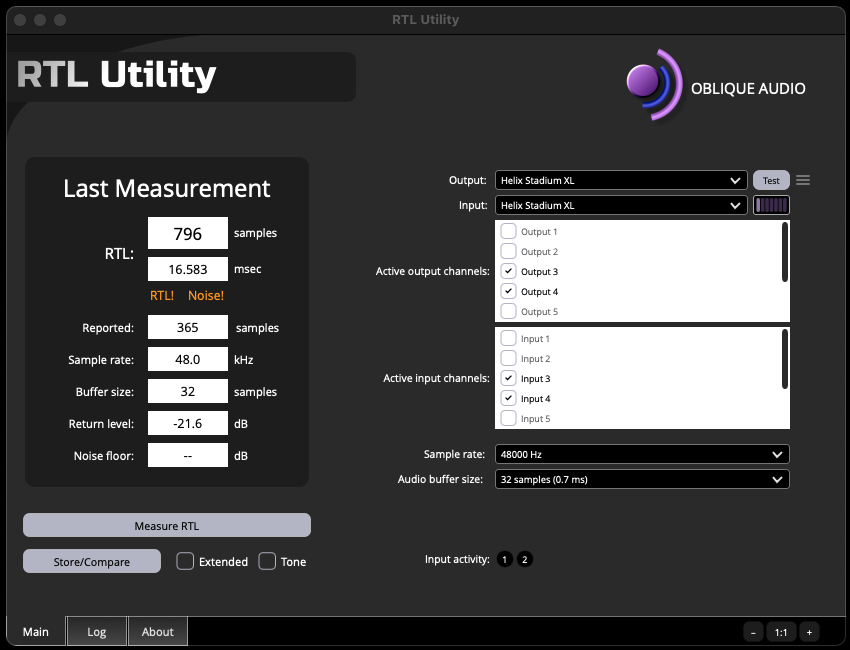
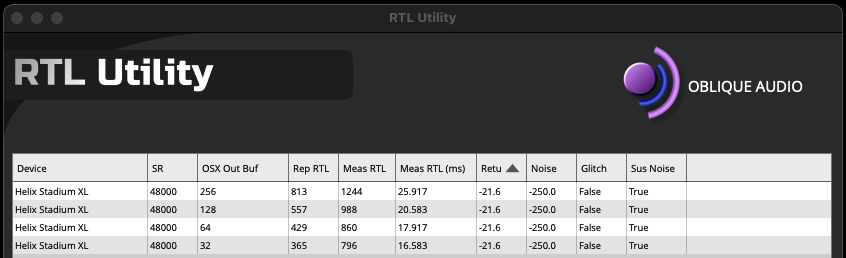
Please note that this warning showed up which may affect the results. I measured the Helix Stadium several times and got similar RTL results.
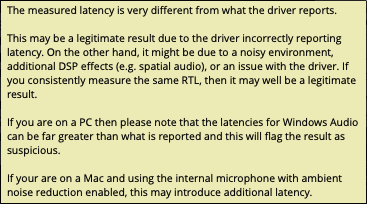
RTL Utility Test Results
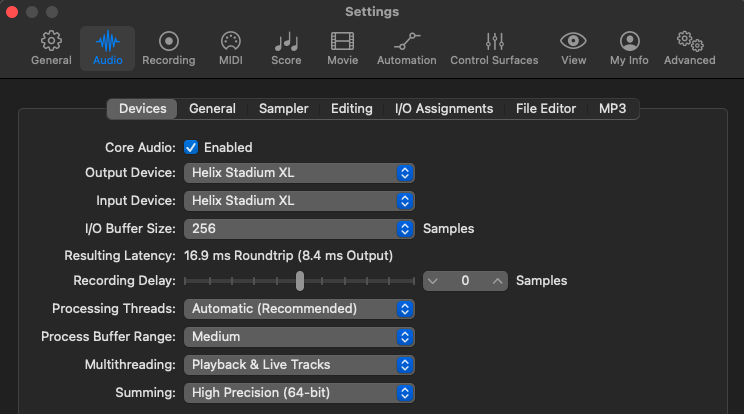
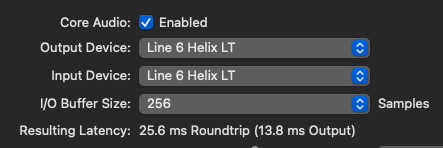
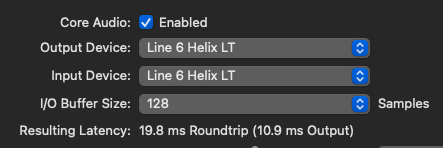
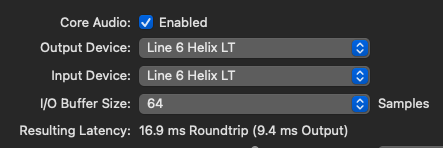
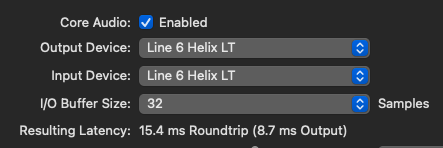
Here is what Logic Pro is reporting at buffer sizes 256,128, 64, and 32. The computer that I ran the tests on is a M1 Mac Studio with the Max Processor.
The Mac Studio with an Apple M1 Max processor scores 2,419 for single-core performance
Helix Stadium Resulting Latency in Logic Pro
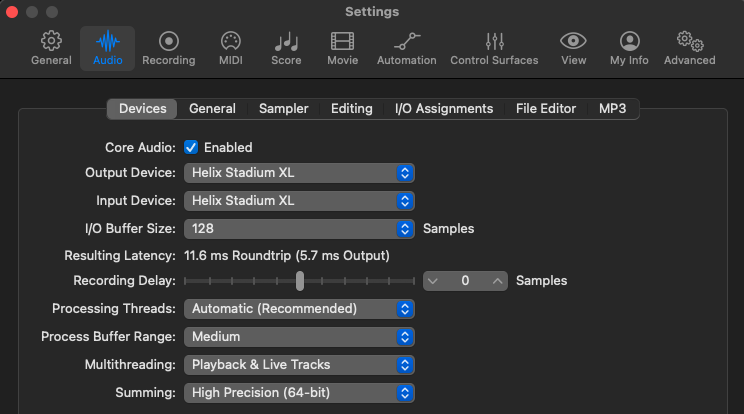
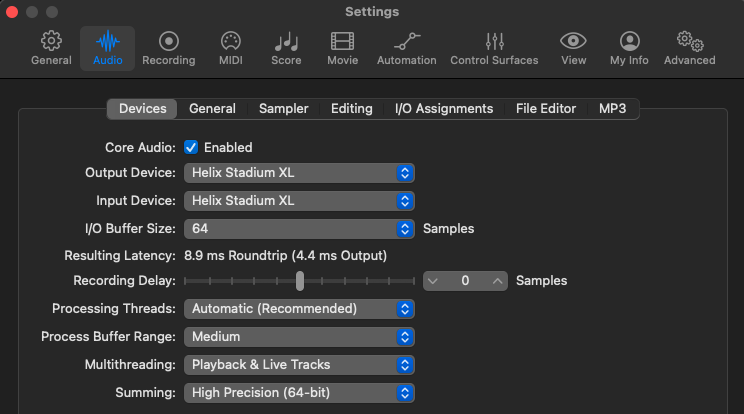
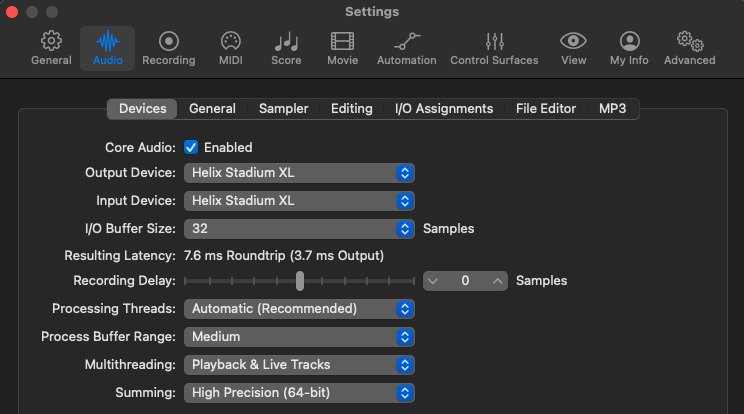
Helix LT Resulting Latency in Logic Pro
In Summary
The Helix Stadium has better latency results than the original Helix, but there is definitely room for improvement. My hope is that Line 6 developers take some time to improve the Helix Stadium USB drivers. So many people rely on using virtual instruments when recording and using a single interface greatly improves the workflow when writing songs. It would be great to track everything with just the Helix Stadium instead of switching between audio interfaces.
I also have HELIX Presets available, so go check them out.
Post in thread 'Line 6 Helix Stadium Talk' that shows additional latency tests
Here is a more detailed explanation if you want to nerd out some more.
How Latency, USB Drivers, and Single-Core CPU Speed Affect Virtual Instrument Performance in a DAW
Latency is the time it takes for your audio interface and computer to process audio—like pressing a MIDI key and hearing the sound. Lower latency feels more “real-time,” which is crucial for virtual instruments.
1. Buffer Size + Sample Rate = Latency
Your DAW processes audio in chunks called buffers.
Smaller buffer = lower latency but higher CPU stress.
Higher sample rate (e.g., 48 kHz → 96 kHz) cuts latency but also increases CPU load.
2. USB/Audio Drivers Matter
The audio interface driver determines how efficiently audio data moves in and out of the computer.
Well-optimized drivers (ASIO on Windows, CoreAudio on macOS) allow lower buffer sizes before crackles occur.
Poor or generic drivers increase “overhead,” requiring larger buffers and causing higher latency.
USB versions (USB 2/3/C) don’t directly reduce latency; driver efficiency is the real limiting factor, not bandwidth.
3. Virtual Instruments Are Often Single-Core Tasks
Even on multi-core CPUs, a single virtual instrument patch or single DAW audio thread often runs mostly on one CPU core.
This means:
Single-core speed (clock speed + IPC) is the #1 factor that determines how small your buffer can go before you get pops/clicks.
A fast multi-core CPU doesn’t guarantee great real-time performance if each core isn’t individually strong.
4. How It All Connects
When you play a virtual instrument:
The MIDI note triggers the plugin.
The plugin generates sound using one CPU core.
The audio driver collects the processed audio each buffer cycle.
The interface outputs the signal.
If any part of this chain is slow or inefficient, you must increase the buffer size, which increases latency.
Latency in a DAW—especially when playing virtual instruments—is mainly determined by how fast each audio buffer can be processed. Your audio interface’s drivers control how efficiently audio moves between the hardware and your computer, which affects how small your buffer can be before you get pops and crackles. Most virtual instruments run on one CPU core at a time, so the single-core speed of your processor becomes the main limit on low-latency performance. If the driver is efficient and the CPU core is fast, you can use smaller buffers, which means lower latency. If either struggles, you must raise the buffer size, and latency increases.